





Trade+ is a high quality, easy-to-use and -setup, lightweight trading plugin. It allows your players to send trade requests and trade items and other configurable extras, such as economy money via Vault and XP, through an aesthetically pleasing, highly configurable GUI.
Having issues? Or do you have a suggestion for Trade+?
Send me a private message on Spigot! I have two jobs IRL which take up a lot of my time right now, but support for Trade+ is ongoing at this time. If you have a bug which breaks the plugin or severely affects the operation of your server, I try to upload a fix within 24 hours of your message. Feature requests and other inquiries might take up to a week to get a response.

- Customizable
- Support for 1.7.10-1.19.x
- Trade between worlds and block the worlds you don't want players to trade in.
- Trade items
- Trade money with Vault and an economy plugin
- Trade XP
- Trade TokenEnchant Tokens
- Trade PlayerPoints
- Trade GriefPrevention blocks
- Trade Enjin Points
- Trade TokenManager tokens
- Trade Beast Tokens
- Shift + Right Click to initiate a trade (Configurable) - Set to "disabled" to disable
- Allow or deny trading in areas using WorldGuard (NEW FEATURE!)
- Deny trading in enemy territory using MassiveCraft Factions
- Optionally click chat message to accept trade requests
- Admins can force and spectate trades
- Item blacklist
- Take tax percentages from the extras (economy, exp)
- Sound effects make for a pleasing experience
- Prevent trickery/scamming with configurable anti-scam features
- Configurable maximum trade distance
- Blacklist types of items from trading
- Use lore text and regex to further deny certain items
- Prevent trading in certain WorldGuard regions
- Every single message and item in the menu is configurable

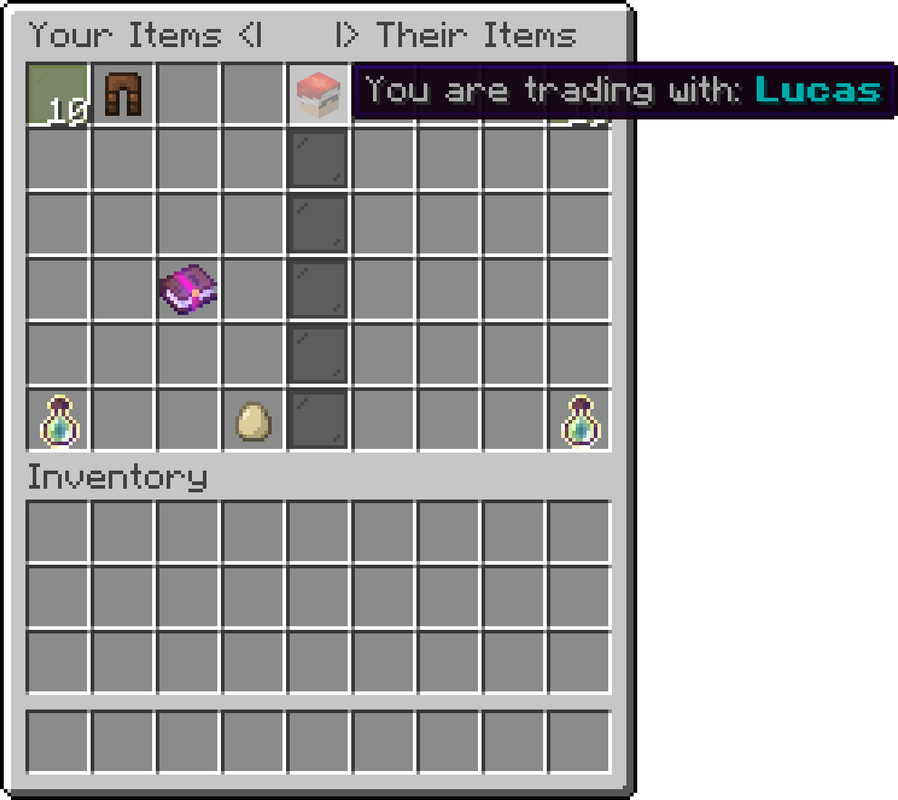


On an economy server, you might like the Vault extension. Your players can easily send money for items! Plugins required: Some economy plugin and Vault
Voting Plugin

Do you have VotingPlugin installed so your players can receive voting rewards? Trade+ has an extension for you - if you want your players to trade vote points, you can enable that in the config!
Do you have VotingPlugin installed so your players can receive voting rewards? Trade+ has an extension for you - if you want your players to trade vote points, you can enable that in the config!
Player Points can be used as a sort of secondary money system. Some servers like to use these as rewards from voting or donating, or you might be using them as your primary economy! Trade+ has an option to trade these easily and securely through the trade menu.
Grief Prevention
If your players are protecting their lands with the Grief Prevention plugin, your players may like to trade their claim blocks for valuable items on your server.
If your players are protecting their lands with the Grief Prevention plugin, your players may like to trade their claim blocks for valuable items on your server.
Many servers like to use tokens as an alternative currency. You can use one of the following token plugins with Trade+!
- Beast Tokens supports all versions
- Token Manager last update was 1.15

mineverse.com
minetime.com
vexius.org
cc.minecraft.is
play.labmc.us
boss.apexmc.co
mc.zamanpvp.com
158.69.122.139:25565


The commands of Trade+ are straightforward and easy to use.
- /trade <player> Send a trade request
- /tradeplus reload Reload config files
- /tradeplus force <player1> <player2> Force 2 players to trade
- /tradeplus spectate <player1> <player2> Spectate an ongoing trade

Like the commands, the permissions are simple to use.
- tradeplus.admin - Permission for the /tradeplus command and to get notified when players begin trading
- tradeplus.admin.silent - Disable trade notifications
- tradeplus.trade - Permission to send trade requests with /trade, given by default.

Trade+ has two configuration files.

The config.yml contains most of the configuration for the plugin: the item blacklist, gui, extras, sound effect settings, etc.
Click here for default config.yml

The lang.yml contains message-related configurations for the plugin.
Click here for default lang.yml
Check out my other premium plugins:

Spigot PMs: Click Here
E-Mail: 502badgamer@gmail.com


