








- Bridging Mode
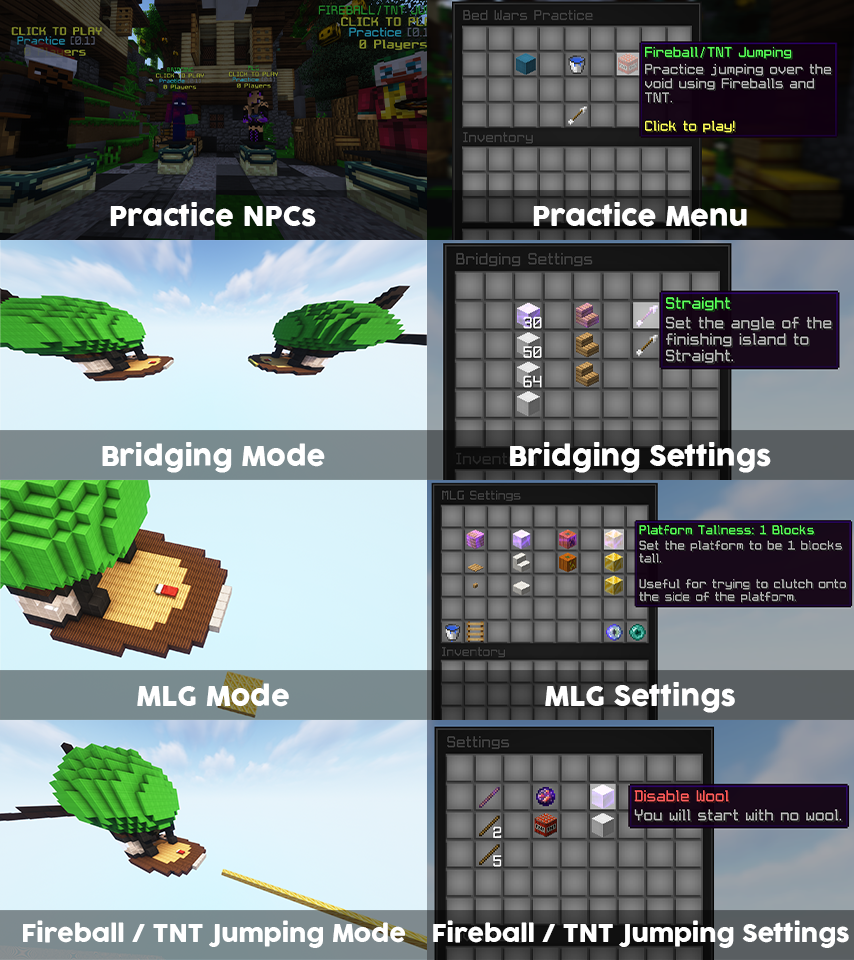
- Players spawn with 4 stacks of wool, and must reach the island nearby, by beating their best time.
- Players can change practice settings.
- MLG Mode
- Players spawn with a Water Bucket and they must land without getting damage.
- Players can change practice settings.
- Fireball/TNT Jumping Mode
- Players spawn with fireballs, and they must fly as long as possible to beat their high score.
- Players can change practice settings.
- Practice NPC (requires Citizens)
- There are 4 types of NPCs:
- Menu (Will open the Mode Selector Menu)
- Bridging
- MLG
- Fireball / TNT Jumping
- There are 4 types of NPCs:
- Spectator Mode
- Players can spectate each other practicing
- Proxy Support
- Integration with BedWarsPracticeProxy
- Player Statistics
- Bridging Mode
- Fireball / TNT Jumping
- Lobby Options
- Teleport upon joining
- Toggle join or quit messages
- Allow damage from players and mobs
- Block break protection
- Remove hunger

- Per-Player Language
- Integration with BedWars1058 (at least 22.01)
- Scoreboard
- For each practice mode
- Tablist & Chat Formatting
- PlaceholderAPI support
- Placeholders (click for placeholders list)
- Languages:
- English
- Romanian
- Polish
- Deutsch
- Chinese
- Italian
- Vietnamese
- Database:
- MySQL (Store data across multiple practice servers)
- FlatFile (Store data locally)
- Inventory Cache
- Cooldown (upon switching practice modes)
- Customisable config
- Developer API


- Player commands
- /bwp (Opens the Mode Selector Menu)
- /bwp quit or leave (Quits the practice arena)
- /bwp bridging (Joins Bridging Mode)
- /bwp mlg (Joins MLG Mode)
- /bwp fireballtntjumping (Joins Fireball/TNT Jumping)
- /bwp spectate (Spectate a player)
- /bwplang (Change the displayed language)
- Admin commands | bedwarspractice.admin / bedwarspractice.*
- /bwpa setLobby (Sets the practice lobby)
- /bwpa schem
- create (Teleports to the schematic creator world)
- list (List with required practice schematics)
- load <name> (Load a practice schematic from the plugin)
- pos <1, 2, wand> (Select the containing blocks of a practice schematic)
- save <name> (Save practice schematic)
- leave (Leave the schematic creator world)
- /bwpa setup
- list (List with required practice configurations)
- set <name> (Load the schematic and teleport to schematic's spawn)
- pos <1, 2, wand> (Select the containing blocks that should mark the finished state)
- save (Unloads the schematic and saves the practice configuration)
- quit (Leave the practice setup)
- /bwpa setNPC (Set Practice NPC)
- /bwpa deleteNPC (Delete Practice NPC)
- /bwpa build (Allow building in lobby, for the executor)

[OFFICIAL DEMO SERVER]
79.137.115.101:25578
Community BedWars Practice servers
(Submit your server today!)

- Compatible server versions: 1.8.8, 1.12.2, 1.18.2 and 1.19.x
- Compatible server software: Spigot and Paper Spigot
- Forks may work, but not guaranteed
- Fox Spigot is not compatible
- Required Java version:
- Java 8 for 1.8.8 and 1.12.2
- Java 17 or newer for 1.18.2 and 1.19.x
- Required Plugins: WorldEdit or FastAsyncWorldEdit
- Optional Plugins:
- SlimeWorldManager / AdvancedSlimeWorldManager
- Citizens
- AsyncWorldEdit (If not using FastAsyncWorldEdit)
- PlaceholderAPI

- How to setup the BedWars Practice Lobby
- Choose a location you would like it to act as the BedWars Practice lobby spawn. (It is used when players leave or join the server)
- Your position when executing the command will reflect into the way players are spawned. (Including block standing and facing)
- To set, use: /bwpa setLobby
How to create a schematic for BedWars Practice
- Before you start, here are some crucial informations regarding schematic creation:
- ALWAYS you should face SOUTH (The starting point must be set with the player facing south, as well, viewing the end point)
- IF NOT, the plugin won’t behave as excepted.
- When saving the schematic, your position must represent the way you want the player to spawn.
- Examples:
- If you’re going to save the schematic and below you is void, the player that will join the practice arena will be spawned there and thrown in void, resulting in bad behaviour.
- If you’re going to save the schematic, facing in a weird position (e.g. looking at the ground), the player that will join the practice arena will be spawned looking at the ground.
- When using /bwpa schem load, the schematic will load and paste at your current location. (The schematic file must be present in ‘plugins/BedWarsPractice/Schematics’)
- How to set the positions:
Here we have to create a cuboid region (similar to a world edit selection between two positions).
We go to the top right corner (or any position you would like), and type: /bwpa schem pos 1
Afterwards, you must go to the OPPOSITE corner and type: /bwpa schem pos 2
Good job! You’ve finished setting the positions.
- How to save the schematic:
First, place yourself the way you would like the players to spawn on the schematic.
Then, type: /bwpa schem save <schematic name>
Execution example: /bwpa schem save MLG
You’ve finished setting up a schematic. Good luck setting all of them!
How to setup a schematic for BedWars Practice
Steps:
After you’ve finished setting up all schematics, you’re done!
To exit the schematic creation process, use /bwpa schem leave
Everything is set.
Enjoy using the plugin!
Consider evaluating the plugin and post a review reflecting your experience using this plugin.
In case you’ve encountered an Issue, please consider joining the support server on Discord, or leaving a private message on spigot regarding your issue.
Steps:
- Start the schematic setup by using /bwpa setup set <schematic name>
Execution example: /bwpa setup set MLG
- Next, set the ending positions (in MLG case, the platform spawn region)
Bridging:
- Go to the finishing island and set the positions (similar to world edit cuboid regions).
- The cuboid must contain the location that once passed, marks the practice as finished.
MLG:
- Create a region in front of the spawning island and set the positions. (Pay attention to the example to create the perfect configuration)
To set the position, use /bwpa setup pos <1, 2, wand>
Execution example: /bwpa setup pos 1
- Save the arena by using /bwpa setup save
After you’ve finished setting up all schematics, you’re done!
To exit the schematic creation process, use /bwpa schem leave
Everything is set.
Enjoy using the plugin!
Consider evaluating the plugin and post a review reflecting your experience using this plugin.
In case you’ve encountered an Issue, please consider joining the support server on Discord, or leaving a private message on spigot regarding your issue.

- No refunds
- The plugin can be tested on the listed servers above.
- No redistribution
- You are not allowed to resell, post or share this resource elsewhere.
- One purchase per Network
- You can use this plugin on as many servers as you would like, but they must be a part of a BungeeCord network.
- Unlimited support
- All buyers will receive support from the author.
- Spoken languages are English and Romanian.


