

![:【Kix's Chat Announcer ++】: Multi-line ⭐ Auto-center ⭐ In-game editor ⭐ Hex & More! [1.8-1.21]](/data/resource_icons/0/224.jpg?1738809490)



ANNOUNCEMENTS THAT STAND OUT.
kix's auto chat announcer ++ is a feature packed plugin that seamlessly integrates with your server to let you create beautiful, content rich automatic announcements in chat, all in-game.

 All in-game editor
You won't ever have to touch the config. Change settings, add, edit, delete, and more all in-game.
Per-world broadcastsRestrict certain broadcasts to only appear in certain worlds. Not your thing? You can go global, too.
Multi-line broadcastsUse as many lines as your heart desires.
Automatic centeringVisually improve your broadcasts appearances by utilizing the option of automatic chat centering.
Custom color supportIf you're using 1.16 or above, you can use hex values for custom colors in chat with "&#hexvalue"! Regular preset colorcodes will work as well. You can easily find hex values with Googles color picker tool: https://www.google.com/search?q=color+picker
Incredibly customizableTweak just about everything about the plugin to work the best for your servers own style and needs. Set headers, footers, prefixes, interval, order, alignment and more.
Ordered (1, 2, 3, etc) or random (3, 1, 2, etc) broadcasting modesSet the broadcasting order that works best for your announcement contents.
Permission based broadcastsRestrict broadcasts to only be shown to players with a required permission (that you can determine).
Placeholder API Support (+ additional built in placeholders)Add dynamic player specific text from plugins you love to show stats or other info in your announcements.
Sound broadcastsGrab players attention by playing a sound when a broadcast appears in chat.
Per-player toggle broadcast visibility commandAllow players to hide broadcasts for them, if they prefer them hidden.
Style presetsDon't know where to start with customization? Quickly style your announcements by applying one of the of beautiful built in header and footer presets with your choice of colors.
Instant Configuration UpdatesMaximize your efficiency: the second you change a setting with an in-game command, it's live. No need to ever restart or reload the plugin!
Rich tab completionEnjoy effortless writing with rich tab completion support for all commands to help guide you through them and save your time. As you write commands, you'll see insightful information such as what has to be written next or if there's a problem with what's currently written (in beta), and more!
_________________________________________________________________________________________________________
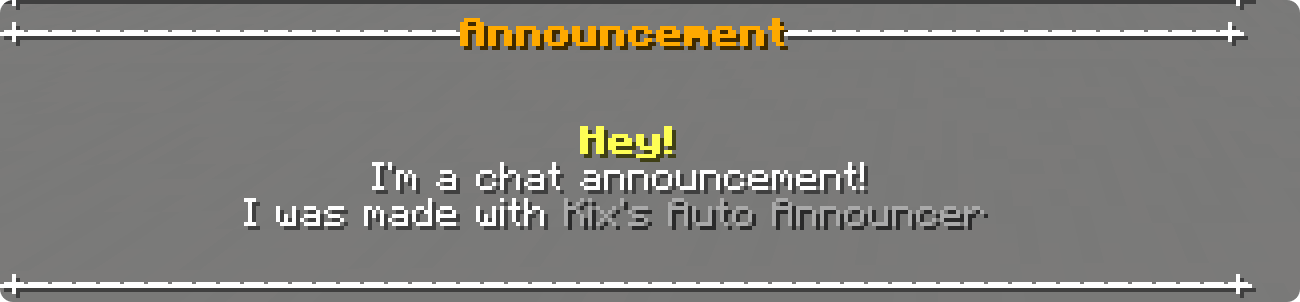

Automatic centering adds an element like no other to your announcements appearances. Each announcement can be configured to be either left or center aligned.
_________________________________________________________________________________________________________



Utilizing the built in placeholders along with Placeholder API, you gain access to tons of placeholders to showcase dynamic and per-player information to your players.
_________________________________________________________________________________________________________



Kix's Auto Announcer gifts you with the ability to customize just every aspect of how your announcements look, you can go as simplistic or detailed as you like!
_________________________________________________________________________________________________________
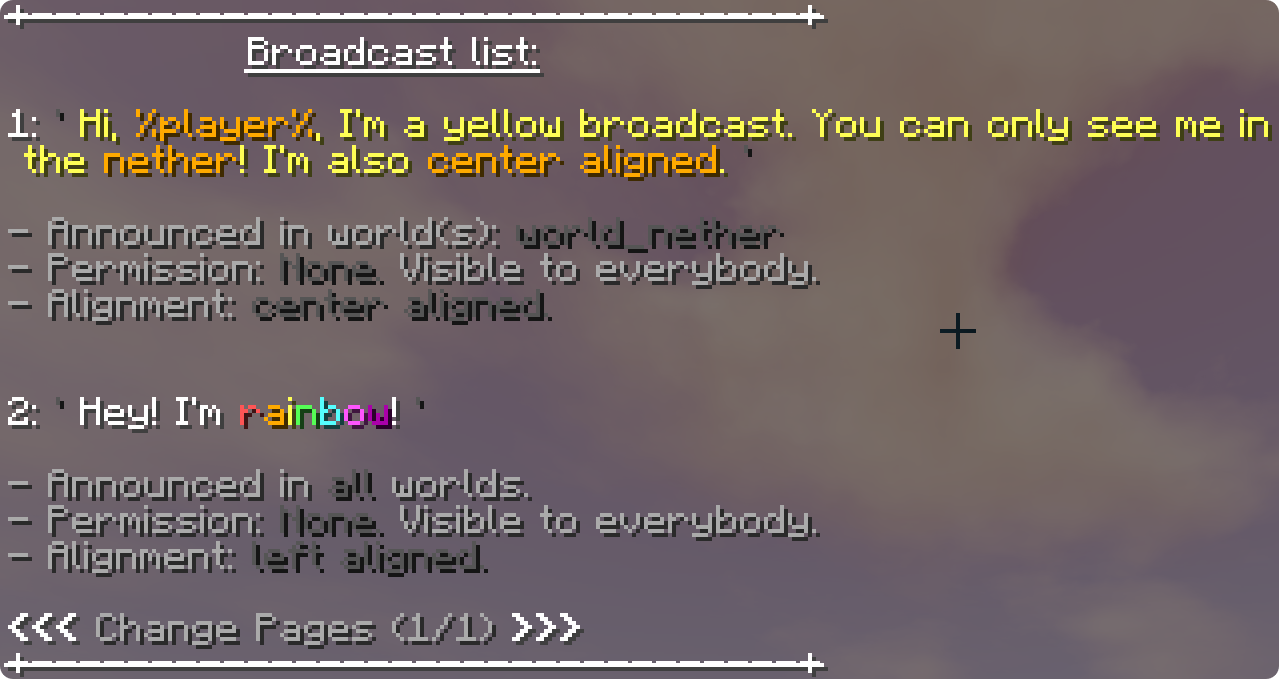
The above showcases the in-game broadcast list (/an broadcastlist), which shows your added broadcasts along with their unique attributes.

Make a typo? No problem. Easily edit any broadcast after it's been added with the /an edit command.
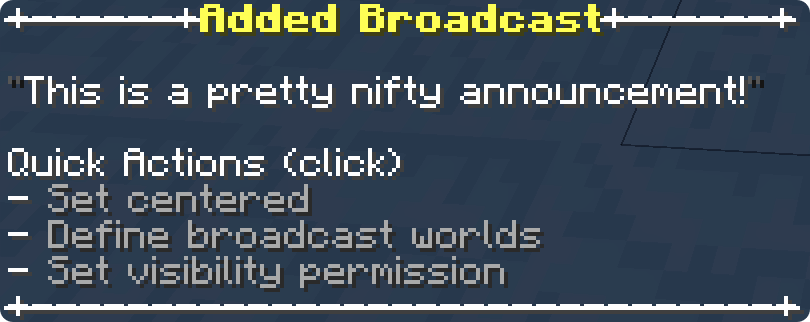
Quickly add modifiers to announcements right after they're created using quick actions, or add / edit them any time later with commands.
_________________________________________________________________________________________________________
_________________________________________________________________________________________________________

PERMISSION NOTE
All commands unless other specified require the announcer.admin node to use.
COMMAND ALIASES
Commands can start with /announcer, /an (recommended), /kca, /kaa, or /kixsautoannouncer.
All commands unless other specified require the announcer.admin node to use.
COMMAND ALIASES
Commands can start with /announcer, /an (recommended), /kca, /kaa, or /kixsautoannouncer.
Core Commands
01 /an addbroadcast <broadcast content>
Add a broadcast.
02 /an delete <broadcast number or 'all'>
Delete a broadcast or purge all.
03 /an edit <broadcast number>
Edit a broadcasts text.
04 /an reload
Restart the plugin without having to restart your server. (thanks to instant config updates, this is only necessary if you edit the config file directly)
05 /an presets
Quickly apply a preset to make customization easy.
Add a broadcast.
02 /an delete <broadcast number or 'all'>
Delete a broadcast or purge all.
03 /an edit <broadcast number>
Edit a broadcasts text.
04 /an reload
Restart the plugin without having to restart your server. (thanks to instant config updates, this is only necessary if you edit the config file directly)
05 /an presets
Quickly apply a preset to make customization easy.
Modifier Commands
01 /an setsound <sound or 'none'> [optional pitch]
Set a sound to play every time an announcement is broadcasted.
02 /an setpermission <broadcast number> <permission or 'none'>
Set the permission needed to be able to see a broadcast.
03 /an setworlds <broadcast number> <world, world, etc, or 'all'>
Set worlds a broadcast will only be visible in. Defaults to all worlds.
04 /an setheader <header or 'none'>
Set the headers (line above broadcasts) content.
05 /an setfooter <footer or 'none'>
Set the footers (line below broadcasts) content.
06 /an setprefix <prefix or 'none'>
Set the prefix shown before each broadcast.
07 /an tha
Toggle header alignment to be centered or left aligned.
08 /an tfa
Toggle footer alignment to be centered or left aligned.
09 /an setinterval <time>
Toggle set the broadcast interval. Ex. /an setinterval 15 m 30 s, = broadcast every 15 minutes and 30 seconds.
Set a sound to play every time an announcement is broadcasted.
02 /an setpermission <broadcast number> <permission or 'none'>
Set the permission needed to be able to see a broadcast.
03 /an setworlds <broadcast number> <world, world, etc, or 'all'>
Set worlds a broadcast will only be visible in. Defaults to all worlds.
04 /an setheader <header or 'none'>
Set the headers (line above broadcasts) content.
05 /an setfooter <footer or 'none'>
Set the footers (line below broadcasts) content.
06 /an setprefix <prefix or 'none'>
Set the prefix shown before each broadcast.
07 /an tha
Toggle header alignment to be centered or left aligned.
08 /an tfa
Toggle footer alignment to be centered or left aligned.
09 /an setinterval <time>
Toggle set the broadcast interval. Ex. /an setinterval 15 m 30 s, = broadcast every 15 minutes and 30 seconds.
Info Commands
01 /an help [page number]
Shows these commands!
02 /an info
See general plugin information.
03 /an broadcastlist [page number or 'compact']
See added broadcasts and their attributes.
04 /an placeholders
See built in placeholders, and other related info.
05 /an preview [optional broadcast number]
Preview how announcements look.
06 /an colorcodes
See a list of available colorcodes.
Shows these commands!
02 /an info
See general plugin information.
03 /an broadcastlist [page number or 'compact']
See added broadcasts and their attributes.
04 /an placeholders
See built in placeholders, and other related info.
05 /an preview [optional broadcast number]
Preview how announcements look.
06 /an colorcodes
See a list of available colorcodes.
Toggle Commands
01 /an togglebroadcasts
Pause / resume broadcasting.
02 /an toggleorder
Toggle between linear & random broadcasting modes.
03 /an togglealignment <broadcast number>
Toggle a broadcasts alignment to be centered or left aligned.
Pause / resume broadcasting.
02 /an toggleorder
Toggle between linear & random broadcasting modes.
03 /an togglealignment <broadcast number>
Toggle a broadcasts alignment to be centered or left aligned.
Console-Only commands
01 /an exportstyle
Export the header, footer, prefix, and centering options into one magical string of code.
02 /an importstyle
Import an exported style code.
Export the header, footer, prefix, and centering options into one magical string of code.
02 /an importstyle
Import an exported style code.
Player Commands
03 /an toggle
Hide or show broadcasts for you. Requires announcer.toggle to use.
Hide or show broadcasts for you. Requires announcer.toggle to use.

USEFUL NOTE
You can see this entire list in-game with /an placeholders
WHAT ARE PLACEHOLDERS?
Placeholders are a form a dynamic text that can be added in any broadcast, headers, footers, whatever you like. Upon broadcasting the receiving player(s) will have per-player information shown to them.
You can see this entire list in-game with /an placeholders
WHAT ARE PLACEHOLDERS?
Placeholders are a form a dynamic text that can be added in any broadcast, headers, footers, whatever you like. Upon broadcasting the receiving player(s) will have per-player information shown to them.
Built in placeholders:
Miscellaneous:
- %nl% Insert a new line / line break.
Please note: When adding new lines, there must be some form of text after %nl% in order for the new line to appear. If you're looking to create a blank new line for space, simply use %nl%&r %nl%. - &<colorcode> (Chat colorcodes)
- If you're using 1.16 or above, you can use hex values for custom colors in chat with "&#hexvalue". Regular preset colorcodes work as well. For example: "{&{#bc42f5}Custom color message! &dPreset color message!". You can easily find hex values with Googles color picker tool: https://www.google.com/search?q=color+picker
Symbols:
- %->% ⇨
- %<3% ❤
- %star% ★
- %x% ✖
Player-related:
- %kaa_player% Receivers username.
- %kaa_player_displayname% Receivers displayname with its original colors
- %kaa_player_displayname_stripped% Receivers displayname stripped of its original colors (so you can change its color)
- %world% World that the receiver is in.
- %deaths% Receivers death count.
- %health% Receivers health /20 ❤
- %hunger% Receivers hunger /20
- %exp% Receivers exp level.
- %locX% Receivers X axis.
- %locY% Receivers Y axis.
- %locZ% Receivers Z axis.
WANT MORE PLACEHOLDERS?
Kix's Auto Announcer supports PlaceholderAPI (by clip) to let you access tons of placeholders from other plugins!
Simply follow the installation instructions on Placeholder API's page, and Kix's Auto Announcer will automatically detect any placeholders from Placeholder API.

Need help, have questions or suggestions?
Join the Discord server!
By joining, you can gain access to the plugins discussion channel to chat with fellow KAA++ users, make suggestions, give feedback, and more related to the plugin!
UPDATE NOTE
If you're updating from an old version of Kix's Announcer and a new folder is created...
You can covert your old config to the new one by simply copying everything from the old config and pasting it in the new one! KAA++ will automatically translate your announcement config format to the new version if necessary.
By joining, you can gain access to the plugins discussion channel to chat with fellow KAA++ users, make suggestions, give feedback, and more related to the plugin!
UPDATE NOTE
If you're updating from an old version of Kix's Announcer and a new folder is created...
You can covert your old config to the new one by simply copying everything from the old config and pasting it in the new one! KAA++ will automatically translate your announcement config format to the new version if necessary.

If the above clickable text does not work, below is the link to directly access the terms: https://kixmc.gitbook.io/kixmcs-product-resources/

Thank you! Your feedback is valued greatly.
Any support requests or bug reports in the reviews will be disregarded, instead use one of the support options mentioned above!


